Live Sports & Events
How to Watch World Cup 2026: Legal TV & Streaming Setup
- Date
- Not recorded
- Broadcast window
- Not recorded
- Platform
- Not recorded
- Region restriction
- No restriction noted
Last-verified date not yet recorded for this event.
How to Watch World Cup 2026: A Legal TV and Streaming Setup Guide
The 2026 FIFA World Cup is jointly hosted by the United States, Mexico, and Canada, and the tournament window runs June 11–July 19, 2026 with a 48-team field (tournament overview). “How to watch World Cup 2026” is not one global app download—it is a territory-first setup: confirm where you will watch, pick a legal TV or streaming path for that market, finish account and device prep early, and know what “free” really means.
This tutorial gives you a complete, legal workflow with an observable finish line: one primary watch path, one backup, working logins, and a match-day checklist.
What you need before kickoff
Collect these inputs first. Most last-minute stream failures come from skipping them.
| Input | Why it matters | Completion check |
|---|---|---|
| Country / home region | Rights are sold market by market | You can name the market you will watch from |
| Language preference | English and Spanish (or other) feeds often sit on different services | You know which audio track you want |
| Devices | Apps, browsers, and smart TVs differ | Phone, laptop, and/or living-room TV are identified |
| Existing TV / live-TV login | Many “free with TV” streams need provider authentication | Username/password or SSO works today |
| Travel during June–July 2026 | Hotels and geo rules can block a home subscription | You know where you will be for key matches |
Completion standard for this guide: by the end, you should have one primary legal watch path, one backup path, a working device login, and a written match-day checklist—not a pile of untested app installs.
Step 1: Confirm the market that controls your access
Broadcast and streaming rights for World Cup 2026 are licensed by territory. The legal service in the United States is not automatically legal in Canada, Mexico, the UK, or elsewhere. Start with:
- The country of your payment method and streaming/TV account.
- The country where you will physically watch.
- Any travel that could change either of the above during the tournament.
Prefer official broadcaster and streamer pages for that country over social posts and random “watch free HD” lists. If you will travel, plan a temporary local option (hotel TV, free-to-air where available, or a second legal service) instead of assuming a home login works everywhere.
Step 2: Map legal U.S. options (TV + official streaming)
FOX family (English-language U.S. starting point)
For many U.S. viewers, the clearest rights-holder surface available today is the FOX Sports distribution stack. On FOX Sports’ FIFA World Cup coverage, matches are presented as airing on FOX and FS1, with streaming via FOXSports.com and FOX One (described as the official streaming platform). Access is framed as signing in with a TV provider or signing up. The FOX Sports app is also positioned for live scores, highlights, analysis, and full-match replays, with live matches available on FOX One.
Practical U.S. setup on that path:
- Check whether your cable, satellite, or live-TV bundle already includes FOX/FS1.
- Open the FOX Sports FIFA World Cup page, pick your surface (linear TV, site, FOX One, or app), and complete provider sign-in before match day.
- If you do not have FOX/FS1, evaluate the official signup path for FOX streaming rather than unofficial “free” links.
- Re-check channel assignments closer to June 2026—group-stage and knockout windows can still share the same rights stack while moving individual matches across channels.
What this does not prove yet: a final national channel grid for every match, every Spanish-language package, or every free over-the-air exception. Treat FOX/FS1/FOX One as the verified English-language U.S. starting point, then refresh official pages as the TV schedule firms up.
Peacock and other services fans keep asking about
Search interest around Peacock World Cup 2026, Will Peacock stream World Cup 2026, and Peacock World Cup 2026 price is high. At the time of writing, do not treat social rumors or keyword interest as confirmed English-language (or full-tournament) rights. Until Peacock or NBCUniversal publishes a clear World Cup 2026 rights and schedule page for your market, keep Peacock as a watch-list item, not your only plan.
Same rule for any other app name in ads or group chats: if the rights holder has not stated the package for your country, assume it is unconfirmed.
Step 3: Understand “free” vs paid without illegal streams
“Where to watch World Cup 2026 for free” usually maps to one of these legal patterns—not pirate sites:
- Free-to-air / free linear channels in some markets (often limited to selected matches).
- Provider-authenticated streams that feel free if you already pay for cable, satellite, or a live-TV bundle that includes the rights channels.
- Time-boxed free trials on legal streamers (card required; not guaranteed for the full tournament).
- Public viewing at bars, clubs, or fan fests that hold commercial licenses.
Illegal streams look convenient, then fail at kickoff, inject malware, or disappear mid-match. If a site promises every match in 4K with no login and no rights-holder branding, treat it as untrusted.
Completion check: you can explain, in one sentence, whether your free option is free-to-air, already-paid TV authentication, a trial, or public viewing—not “a random link.”
Step 4: Build a primary + backup watch stack
World Cup match days stress every platform. Use two layers, not five half-configured apps:
| Layer | Role | Example pattern (U.S.) |
|---|---|---|
| Primary | Default live path | TV provider + FOX/FS1, or official FOX One signup |
| Backup | Different delivery path, same legal rights when possible | Second device on the same account, or official site if the app fails |
| Companion | Scores, replays, analysis | Official broadcaster app / site |
If you need a second language, treat that as a named requirement (for example, English on the primary service and a separate licensed Spanish-language service) instead of discovering the gap at 90'.
For non-U.S. markets, swap in the local rights holder using the same primary/backup pattern: official linear channels first, then the rights holder’s authenticated stream, then a tested backup device.
Step 5: Finish device and account setup before the first match
Do this at least a few days early:
- Update apps and OS on the TV, phone, tablet, and laptop you will use.
- Sign in on every device that might host a match (including a browser path if the app fails).
- Test a live or on-demand sports stream on the same stack so you know login, DRM, and casting work.
- Save offline credentials for provider SSO (password manager entry, not a screenshot in a chat).
- Set power/sleep settings so the living-room device does not drop the stream during extra time.
- Confirm bandwidth for HD live video; wired Ethernet or a strong 5 GHz Wi‑Fi link beats a crowded guest network.
Completion check: you can start a stream on your primary device in under two minutes without hunting for a password.
Step 6: Use a match-day checklist
Use the same workflow for every game:
- T-60 minutes: confirm kickoff time in your time zone and which channel/app carries this match.
- T-30 minutes: open the primary stream, dismiss update prompts, and verify audio language.
- T-10 minutes: if the primary path fails, switch to the backup path—do not start googling new sites.
- Kickoff: keep the companion app for scores only if it does not fight the live stream for bandwidth.
- Halftime: only change devices if the primary path is unstable.
- Full time: note any login or channel issues so the next match starts cleaner.
Completion check: you never need an illegal stream to recover from a failed login.
Step 7: Track schedules and rights updates as June 2026 approaches
“World Cup 2026 TV schedule USA” searches will spike once the full channel grid is published. Until then:
- Follow the official rights-holder pages for your market (for U.S. English, start with FOX Sports’ World Cup hub).
- Recheck channel assignments after the final draw and again before the knockout rounds.
- Treat third-party schedule aggregators as secondary; confirm conflict matches on the rights holder’s site.
- If a service is still only “rumored,” leave it off the primary plan.
Outside the U.S., use the same discipline with your national broadcaster’s World Cup page rather than importing U.S. package names.
Optional discovery layer (not a rights stream)
If you also track movies and series across many apps year-round, a discovery site such as StreamFinder (tonightwatch.com) can help you compare platform hubs and catalog context in one place—but it does not replace the World Cup rights holder’s own stream. Any curated-list style browsing on a discovery product is only a supporting convenience for everyday catalog questions, not a live-match rights path.
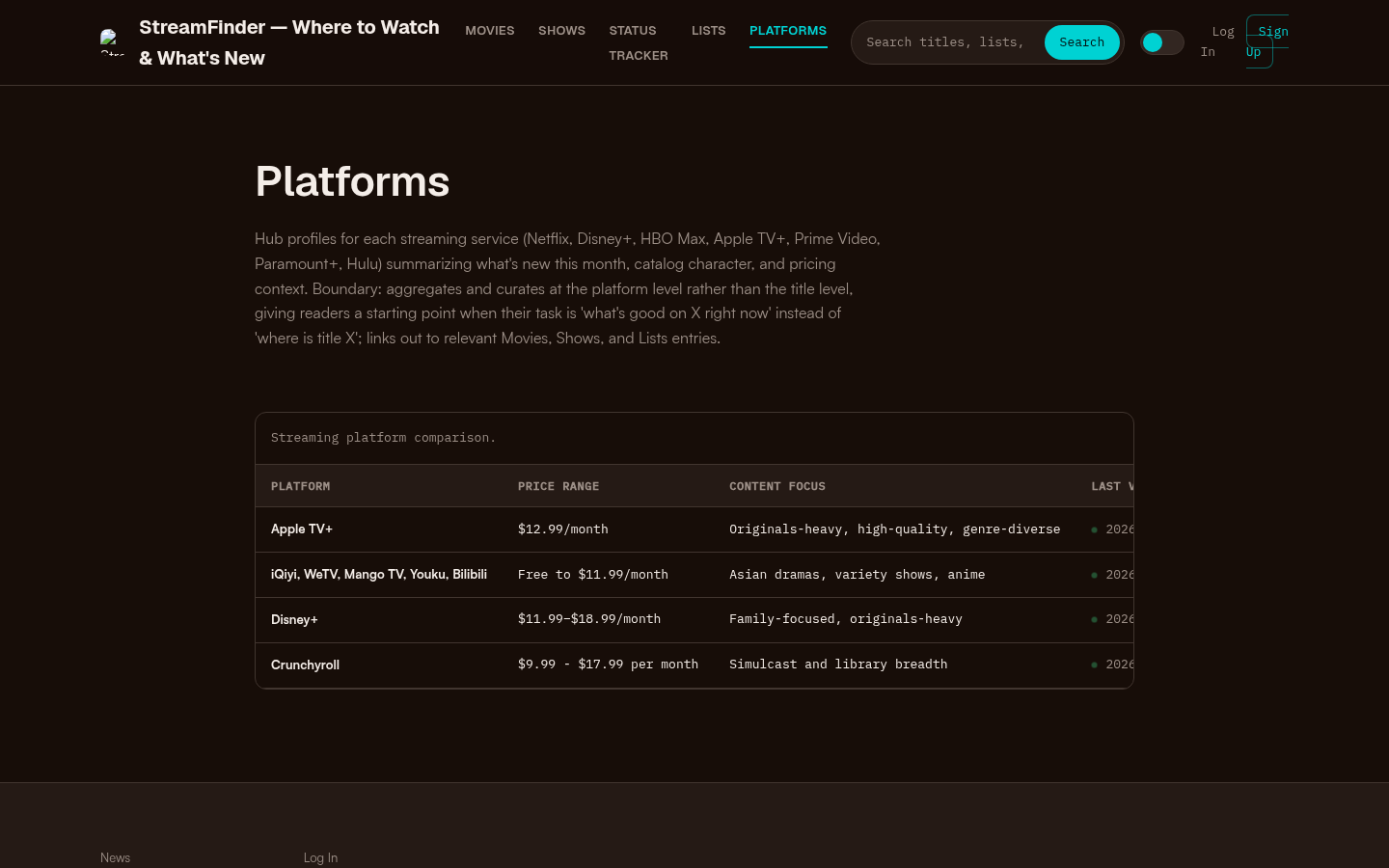
Platforms page with a streaming platform comparison table showing Apple TV+, iQiyi/WeTV/Mango TV/Youku/Bilibili, Disney+, and Crunchyroll with price ranges and content focus.
Quick FAQ
Where can I watch World Cup 2026 online?
Online access is legal only through the rights holder for your country (or a service they authorize). In the U.S., start with the FOX Sports stack described above, then re-verify official pages for final digital packages.
Is there a free way to watch?
Sometimes—via free-to-air windows, already-paid TV authentication, limited trials, or licensed public viewing. “Every match free in 4K with no account” is not a trustworthy plan.
Will Peacock stream World Cup 2026?
Treat Peacock as unconfirmed for your market until Peacock/NBCUniversal publishes a clear rights and schedule statement. Do not cancel or rely on a single unconfirmed app.
How do I watch if I am traveling?
Plan for the country you will be in, not only the country of your home subscription. Hotel TVs, local free-to-air, and local legal streamers often matter more mid-tournament than a home login.
Finish line
You are done with this guide when you can point to:
- Your market.
- Your primary legal path (channel and/or official stream).
- Your backup path.
- A device that already signs in successfully.
- A match-day checklist that does not include illegal streams.
Set that stack up now—well before June 11, 2026—so kickoff is about the match, not a password reset.