Platform Guides
YouTube TV vs Fubo (2026): Price, Channels, Sports
Last-verified date not yet recorded for this guide.
Compare YouTube TV vs Fubo on price, channels, sports, locals, DVR, and streams. See who each live TV service is best for before you subscribe.
YouTube TV vs Fubo: Which Live TV Streamer Fits Your Household?
Choosing between YouTube TV vs Fubo is less about brand loyalty and more about what you actually watch every week. Both are full live-TV streamers with local channels, sports, news, and cloud DVR. The split is usually this: YouTube TV is the broader household package with multiple plan shapes and a polished Google-backed app experience, while Fubo is still the sports-first option—especially for soccer and live-game density—even after its larger media partnership changes.
This guide compares Fubo and YouTube TV the way a cord-cutter should: price structure, channel philosophy, sports, locals, DVR/streams, picture quality, and who should pick which.
Quick verdict
| Decision factor | Edge |
|---|---|
| Broad entertainment + news + locals | YouTube TV |
| Sports-first lineup / soccer-heavy viewing | Fubo |
| Unlimited cloud DVR (confirmed) | YouTube TV |
| Lower entry sports-focused plan | YouTube TV Sports Plan (official) |
| Household accounts + Multiview | YouTube TV (official) |
| Check current promo math before you commit | Both—prices move |
If you want one service that covers “normal cable replacement” for mixed household tastes, start with YouTube TV. If live sports—especially soccer and game-day channel density—drive the subscription, evaluate Fubo first, then compare the final bill after add-ons and regional sports fees.
How to compare Fubo and YouTube TV without getting lost
Use the same five criteria for both services:
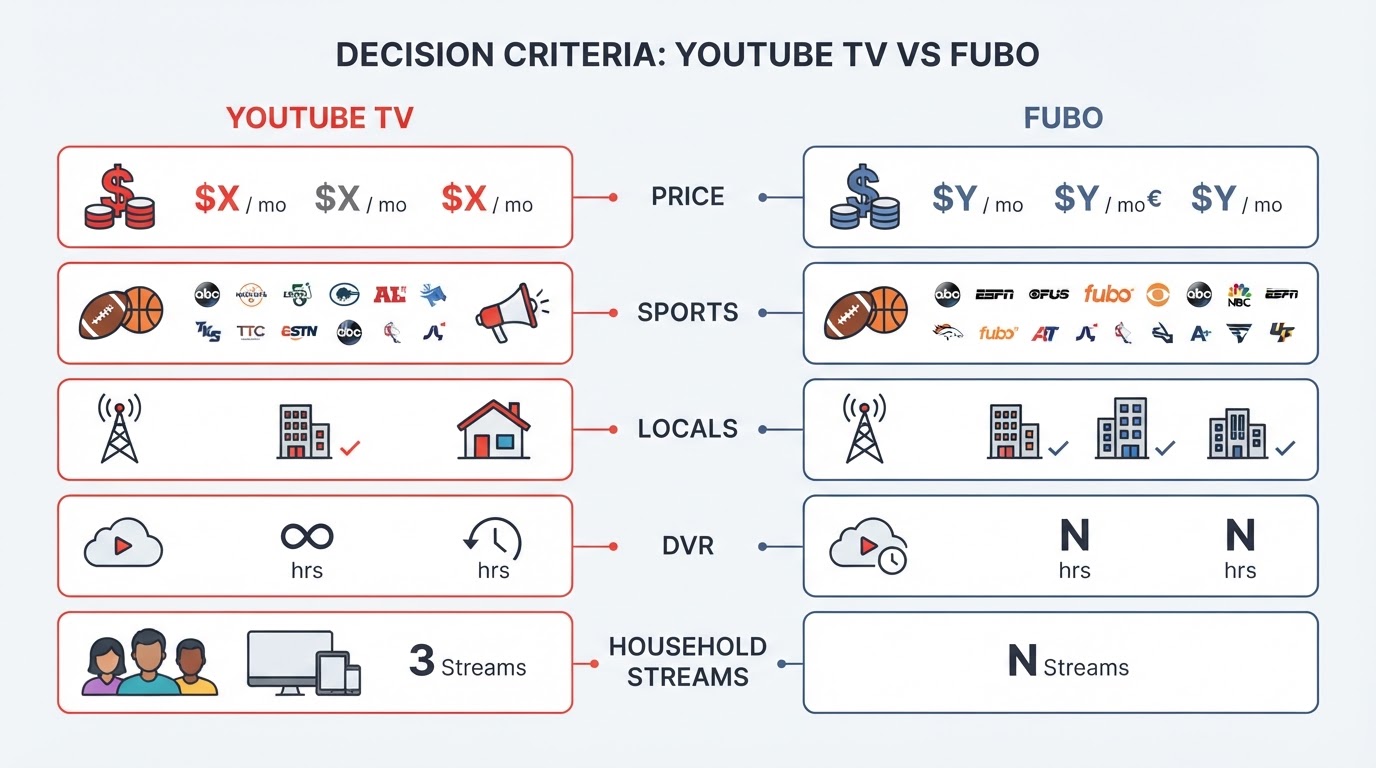
- Monthly floor price after the promo ends (not the teaser rate).
- Must-have channels in your ZIP: locals, RSNs, ESPN family, news, kids, Spanish.
- Sports you actually watch (NFL, NBA, MLB, NHL, college, soccer).
- Household logistics: simultaneous streams, profiles, travel, DVR limits.
- Add-on tax: 4K, premium networks, extra sports packs, regional fees.
A service that looks cheaper at signup can cost more once you add RedZone, premium movies, or regional sports networks. Compare total monthly cost for your lineup, not the marketing base price.
YouTube TV price and plan structure (official)
YouTube TV currently markets two especially relevant entry points on its official welcome page:
- YouTube TV (main plan): about $67.99/mo for the first 3 months, then $82.99/mo thereafter (new-user promo with an end date listed on the offer page; confirm before you subscribe).
- YouTube TV Sports Plan: about $54.99/mo for the first 12 months, then $64.99/mo thereafter (sports-focused plan with locals; same promo window caveat).
Official product claims for those plans include:
- 100+ channels on the main plan (widest variety of news, entertainment, locals, sports).
- 30+ channels on the Sports Plan, with live games, analysis, sports news, plus locals.
- Unlimited DVR storage (recordings kept 9 months per the official marketing page).
- Up to 6 household accounts.
- 3 simultaneous streams (with an option for unlimited streams at home via the 4K Plus add-on).
- Multiview (up to four games), Key Plays, and Stats views.
- No annual contract; cancel/pause/switch language is part of the official offer framing.
Help documentation also confirms the product family now includes multiple genre mixes (Sports, News, Entertainment, Family combinations), not only a single base package. Core features such as Multiview, Family Sharing, concurrent stream limits, and DVR are described as shared across plan types, while channel access changes when you switch.
Useful official add-ons called out on the welcome experience include:
- 4K Plus around $9.99/mo (select 4K, unlimited home streams, offline downloads of recordings).
- Sports Plus / NFL RedZone with Sports Plus around $10.99/mo.
- Entertainment Plus around $29.99/mo (premium bundle positioning).
- Spanish packages and smaller premium/niche add-ons.
Takeaway: YouTube TV’s current pitch is flexibility—full cable-replacement main plan or a cheaper sports-centered plan—plus unlimited DVR and strong multiview tooling.
Fubo price and plan structure (what we can verify)
Fubo’s marketing site is app-driven and harder to pin to a single static price table in this review cycle, so treat live checkout on fubo.tv as the source of truth for today’s bill.
What is established from public company/product descriptions:
- Fubo positions itself as a sports-first live TV streamer with news, entertainment, and movies around that core.
- U.S. product lines have included standard multi-channel packages (100+ linear channels class of offering), sports-focused skinny bundles, Spanish options, premium channel-store add-ons, and free ad-supported channel tiers.
- A Fubo Sports skinny bundle was publicly described around $45.99 for the first month, then $55.99/month in September 2025 coverage of that launch—useful as a dated reference point, not a guarantee of today’s cart price.
- Older public reporting also documented base-package and regional sports network (RSN) fee increases in prior years; RSN surcharges can materially change sports-household totals.
- In late 2025, Disney completed a transaction combining Fubo with Hulu + Live TV operations while keeping brands separate. That corporate context matters for long-term channel strategy, but day-to-day plan names and prices still need a live ZIP-based check.
Practical rule for Fubo vs YouTube TV price: open both sign-up flows with the same ZIP code, select the channels you truly need, add the same sports extras, then compare the post-promo monthly total. Do not stop at headline base rates.
Channel lineups: breadth vs sports density
YouTube TV channel philosophy
YouTube TV’s main plan is built as a general-purpose live TV replacement: locals in most markets, major sports networks, national news, and a deep entertainment/lifestyle stack (Disney, FX, food/home networks, kids, prestige cable brands, and more). Official marketing emphasizes complete local network coverage for a very high share of U.S. TV households, with exact affiliates tied to ZIP.
The Sports Plan narrows that stack to sports networks + locals—useful if you do not want to pay main-plan rates for entertainment channels you never open.
Fubo channel philosophy
Fubo historically wins conversations when the question is “which service carries the sports I care about without padding the bill with channels I ignore?” Soccer depth and sports-centric packaging have been core to the brand. Entertainment and news are present, but the product story is still sports-led.
Channel comparison checklist
Before you pick:
- Confirm ABC, CBS, FOX, NBC (and CW/PBS if they matter) for your ZIP on both services.
- List must-have sports nets: ESPN family, FS1/FS2, NFL Network, NBA TV, MLB/NHL nets, college conference nets, soccer nets.
- Check kids, Spanish, and news separately—those often decide household peace more than one extra sports channel.
- Re-check after any league rights shake-ups; live TV lineups move.
A channel-count trophy is less useful than a personal “channels I actually watch” score.
Sports: the real battleground
Sports is where most YouTube TV vs Fubo debates are won or lost.

YouTube TV strengths (officially emphasized):
- Deep national sports presence on the main plan (ESPN family, FS1/FS2, NFL Network, conference networks, TNT/TBS, golf, and more—exact lineup still ZIP-dependent).
- Sports Plan for people who mainly want games + locals at a lower tier.
- Multiview up to four games, Key Plays, and Stats-oriented viewing tools.
- NFL Sunday Ticket available as a major football add-on path on the YouTube TV ecosystem.
Fubo strengths (product positioning):
- Sports-first packaging and a long reputation among soccer fans and multi-league live-sports households.
- Skinny sports bundle options for viewers who do not want a full entertainment stack.
- Multiview capability on supported devices (publicly documented on some platforms).
Who wins sports?
- NFL / general U.S. big-four + college mix in a mixed household: often YouTube TV, especially if Multiview and unlimited DVR matter on game day.
- Soccer-heavy or sports-only budget: often Fubo first, then validate the exact nets and RSN fees.
- Out-of-market NFL Sundays: model Sunday Ticket + base plan cost on YouTube TV carefully; do not assume either base plan alone covers every out-of-market game.
If sports is 80% of viewing, choose the service whose sports nets and blackout rules fit your teams. If sports is 30% and the rest is news/entertainment/kids, YouTube TV’s broader stack usually feels less incomplete.
Locals, travel, and blackouts
Both services sell local broadcast access as a core reason to replace cable. YouTube TV’s official materials stress broad U.S. availability and ZIP-based local network coverage, with travel rules that can require periodic home-area sign-in. Fubo likewise ties locals and some sports rights to location.
Before you subscribe:
- Enter your home ZIP on both services.
- Confirm your local affiliates and any regional sports nets.
- Ask what happens when you travel for work or vacation.
- Read blackout rules for the leagues you care about.
A “national” plan is still local in practice.
DVR, streams, profiles, and devices
YouTube TV (verified)
- Unlimited cloud DVR with 9-month retention called out in official marketing; help docs also describe DVR without storage-space limits.
- 3 simultaneous streams standard; unlimited at-home streams via 4K Plus.
- Up to 6 accounts with personalized libraries/recommendations.
- Broad device support across smart TVs, streaming sticks, phones/tablets, consoles, and web.
Fubo (verify live)
Public product materials and prior reporting describe cloud DVR tiers and multi-stream households, but exact current stream counts and DVR hour allotments vary by plan and have changed over time. Confirm in the live plan card:
- Included DVR hours vs paid upgrades
- Simultaneous stream limit at home vs away
- Profile/account sharing rules
- Supported living-room devices (Roku, Fire TV, Apple TV, smart TVs, game consoles)
Household rule of thumb: if three people watch different live events at once, stream limits matter more than channel logos. Unlimited or high stream caps plus strong DVR reduce “who has the remote” friction.
Picture quality and reliability
Both services stream HD as the everyday baseline. 4K is typically plan/add-on and title dependent rather than universal.
On YouTube TV, official marketing packages select 4K under 4K Plus rather than as a free default on every title. Fubo has also offered higher-tier quality options historically; treat current 4K availability as plan- and device-specific.
For reliability, prioritize:
- Wired Ethernet or strong 5 GHz Wi-Fi to the main TV
- ISP speed headroom above the service’s recommended bitrate
- A living-room device with a mature app (not the oldest stick in the drawer)
Picture-quality debates on forums (“YouTube TV vs FuboTV picture quality”) usually mix encode quality, home network, and TV settings. Test both free trials on your actual TV before deciding.
Apps, interface, and day-to-day usability
YouTube TV benefits from Google’s account system, a mature guide, strong search, Multiview presentation, and tight integration with the broader YouTube ecosystem. Family sharing and personalized profiles are first-class product features.
Fubo’s interface traditionally emphasizes sports discovery and live-event navigation. If your evenings start with “what game is on?” rather than “what show should we start?”, that sports-forward UX can feel faster.
Neither interface should be the only reason you switch—but bad search or weak multiview can ruin game day.
Add-ons and the real monthly bill
The base plan is the entry fee; the add-on stack is the lifestyle.
Common add-on categories on both ecosystems:
- Premium entertainment networks / bundles
- Extra sports packs (RedZone-class products, niche sports nets)
- Spanish-language expansions
- Storage or quality upgrades (DVR hours / 4K)
YouTube TV’s official welcome page is transparent about several of these price points (for example 4K Plus and Sports Plus). Fubo’s add-on math—including any regional sports network fees—must be calculated in-cart for your ZIP.
Best practice: build the same “final stack” on both services before you declare a winner on price.
Who should choose YouTube TV?
Choose YouTube TV if you:
- Need a true cable replacement for a mixed household (sports + news + entertainment + kids)
- Value unlimited DVR and multi-profile family sharing
- Want Multiview tools for juggling games
- Prefer a main plan or a dedicated Sports Plan under the same product family
- Already live in the Google / YouTube app ecosystem
Who should choose Fubo?
Choose Fubo if you:
- Are primarily a live-sports household and care most about sports channel density
- Watch a lot of soccer or other sports-heavy lineups Fubo historically emphasizes
- Prefer a sports-led product story over a general entertainment stack
- Are willing to verify today’s plan price, RSN fees, and DVR/stream caps in checkout
- Do not need as much non-sports cable filler
A simple decision workflow
- Write your top 15 channels and top 5 leagues/teams.
- Enter the same ZIP on YouTube TV and Fubo.
- Pick the cheapest plan on each that covers those needs.
- Add the same must-have extras (RedZone-class packs, Spanish, 4K, DVR upgrades).
- Compare month 1 promo cost and month 4+ steady cost.
- Trial both on your main TV for a weekend of real watching.
- Keep the service that wins on missed games prevented and household friction reduced, not brand preference.
If you also rotate Netflix, Disney+, Max, or other on-demand apps, remember live-TV streamers solve a different job. A neutral lookup site like TonightWatch can help you check related streaming availability and platform options when you are optimizing the full entertainment budget—not as a replacement for the live-TV decision itself.
Platforms page with a streaming platform comparison table showing Apple TV+, iQiyi/WeTV/Mango TV/Youku/Bilibili, Disney+, and Crunchyroll with price ranges and content focus.
Side-by-side summary
| Category | YouTube TV | Fubo |
|---|---|---|
| Product focus | Broad live TV + flexible genre plans | Sports-first live TV |
| Official main-plan price signal | Promo then ~$82.99/mo (confirm live) | Confirm live on fubo.tv |
| Sports-centered lower tier | Official Sports Plan (~$64.99/mo after promo) | Sports skinny bundle options (verify live) |
| Locals | Strong ZIP-based coverage claims | ZIP-based; verify affiliates |
| DVR | Unlimited; 9-month retention marketed | Plan-dependent; verify hours |
| Streams / profiles | 3 streams; 6 accounts (official) | Verify current plan limits |
| Best for | Mixed households, cable replacement | Sports-heavy viewers |
Bottom line
YouTube TV vs Fubo is a clean trade-off:
- Pick YouTube TV for the more complete household live-TV package, unlimited DVR, Multiview, and official plan flexibility (full main plan or Sports Plan).
- Pick Fubo when sports density is the product, not a feature—and only after the live cart price, RSN fees, and stream/DVR limits still look better than YouTube TV for your teams.
Because live-TV pricing and rights change, treat this as a decision framework backed by current official YouTube TV offer details and carefully dated Fubo context. Run both sign-up flows with your ZIP before you cancel cable or another streamer.
If your shortlist is still tied after pricing, keep the service that prevents the one game or local newscast your household refuses to miss.