
Tubi vs Pluto TV: Which Free Streamer Is Better?
Tubi vs Pluto TV compared: free AVOD libraries vs live channels, ads, devices, and who should pick Tubi, Pluto, or both—plus when Freevee or Plex matter.
Tubi vs Pluto TV: Which Free Streamer Is Better for You?
If you are choosing between free streaming apps, Tubi vs Pluto TV is one of the most useful head-to-heads you can run. Both are no-subscription, ad-supported services built for cord-cutters—but they are not interchangeable. Tubi is best understood as a free on-demand movie and TV library. Pluto TV is best understood as free live TV with an on-demand layer on top.
This guide answers Is Tubi or Pluto better? with a decision framework, not a one-size-fits-all crown. The “winner” depends on whether you want to pick a title and press play, or flip through live channels the way you used to channel-surf.
Quick verdict: when Tubi wins vs when Pluto TV wins
| If you mostly want… | Lean toward |
|---|---|
| Browse a large free catalog of movies and full TV seasons | Tubi |
| Live linear channels you can leave on in the background | Pluto TV |
| Search → pick a specific title → watch on demand | Tubi |
| Channel guide / “what’s on now” free TV | Pluto TV |
| Movie-night picking with friends | Tubi |
| News, lifestyle, sports-style grazing, or ambient TV | Pluto TV |
| Using both without paying for either | Keep both (they solve different jobs) |
Bottom line: Tubi is usually better as your free library. Pluto TV is usually better as your free live TV. Many households should install both rather than force a single winner.
How this Tubi vs Pluto TV comparison works
We score the pair on the same criteria:
- Price and access model — free vs paid tiers, ads as the tradeoff
- Content shape — on-demand depth vs live linear mix
- Watch experience — ads, continuity, interruption feel
- Discovery and UX — search/catalog vs channel guide
- Devices and everyday practicality — living room, phone, smart TV habits
- Fit by viewer type — movie night, background TV, family, news/sports grazers
Free ad-supported catalogs and channel lineups change often. Treat any specific title, channel, or “how many movies” claim as something to re-check in the app before you plan a night around it.
Price and access: both free, both ad-supported
Tubi
Tubi sits in the free ad-supported streaming (AVOD) category. In Fox Corporation’s 2020 acquisition announcement, Fox described Tubi as a leader in free ad-supported streaming and positioned the service around licensed film and episodic TV rather than a paid subscription wall. That ownership and category framing still match how most people use Tubi today: open the app, start watching, accept commercials.
What that means for you:
- No monthly fee is required to start watching core free content.
- Ads are the default tradeoff for access.
- You should not expect a “premium no-ads” experience unless a specific product change is clearly offered in your market’s app (always verify in-app; do not assume a paid tier exists for your account).
Pluto TV
Paramount presents Pluto TV as a free streaming television service—“free TV” built around curated entertainment. Official brand positioning emphasizes hundreds of live linear channels plus thousands of on-demand titles, available across many international markets.
What that means for you:
- Core access is free TV, not a cable-style subscription.
- The product center of gravity is television-like viewing (live channels) with on-demand available as a second mode.
- Ads are the expected commercial model for free linear and free on-demand AVOD services; confirm current ad behavior in your app and region.
Comparison takeaway: Price is not the differentiator. Both can be $0/month daily drivers. The differentiator is what free buys you—a title library (Tubi) versus a free TV lineup (Pluto).
Content libraries: on-demand depth vs live linear mix
This is the main reason “Is Tubi or Pluto better?” has two correct answers.
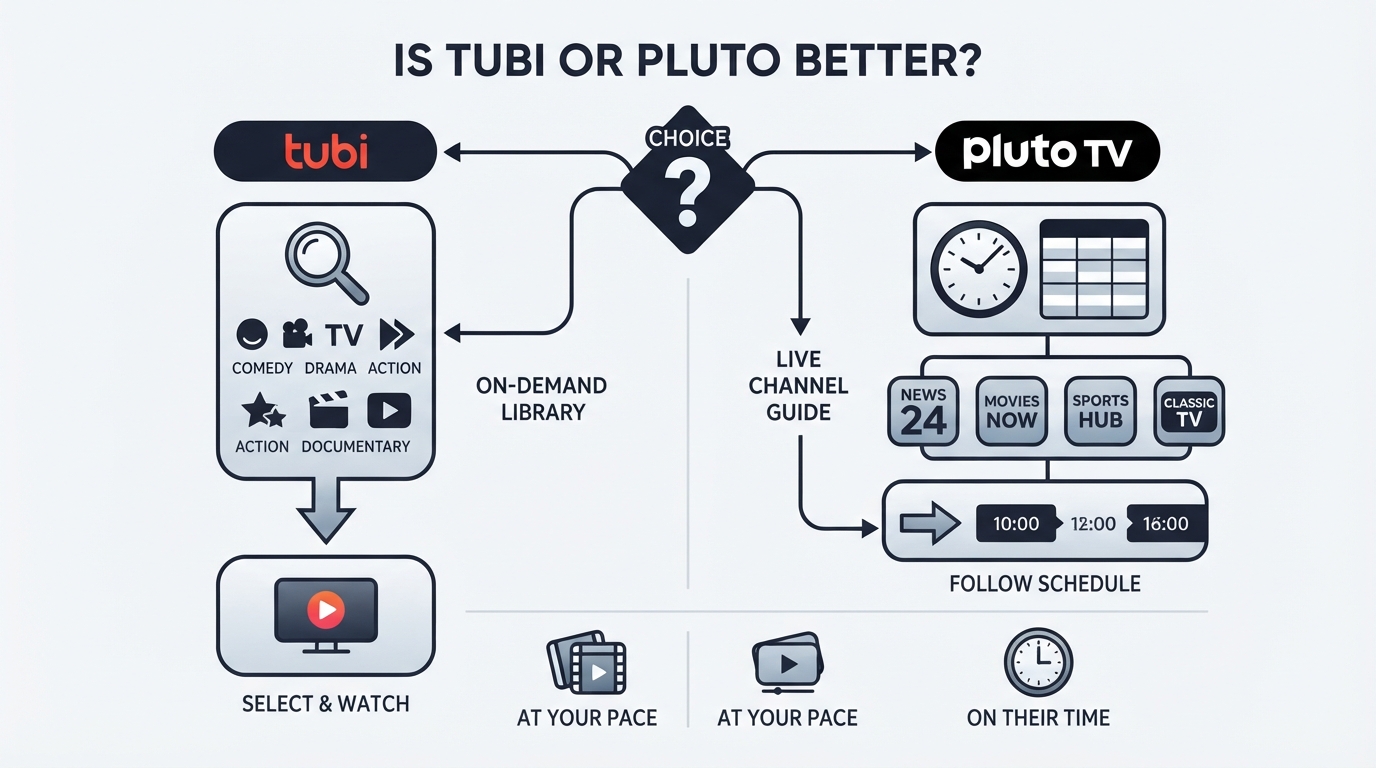
Tubi’s content job: free movies and TV you choose
Tubi’s practical strength is on-demand selection. You search or browse genres, pick a movie or series, and watch from the start (subject to ads and availability). Fox’s 2020 description framed Tubi around a large licensed library of film and episodic television from many content partners. Exact title counts change continuously, so use that history only as proof of category—not as today’s inventory number.
Tubi tends to feel better when your night looks like:
- “Find a comedy under two hours.”
- “Start season 1 of a free series.”
- “Put on a familiar movie without paying a rental.”
Pluto TV’s content job: free live TV plus on-demand
Pluto TV’s official positioning is explicit: live linear channels are core, with on-demand titles alongside them. That creates a different entertainment mix:
- Live channels for continuous programming (entertainment, lifestyle, news-style blocks, themed channels, and other linear feeds depending on market).
- On-demand for catch-up or title-led watching when you do not want whatever is airing now.
Pluto tends to feel better when your night looks like:
- “I want something on while I cook.”
- “I’ll flip channels until something hooks me.”
- “I miss the feeling of free TV without a cable bill.”
Side-by-side content shape
| Dimension | Tubi (typical fit) | Pluto TV (typical fit) |
|---|---|---|
| Primary mode | On-demand catalog | Live linear channels |
| Secondary mode | Some live/linear features may appear by market/app version—verify in app | On-demand library (“thousands of titles” per Paramount brand materials) |
| Best mental model | Free Netflix-style browsing (with ads) | Free cable-style channel surfing + VOD shelf |
| Planning a specific title | Stronger default | Possible, but not the main identity |
| Passive / ambient watching | Possible, but not the core design | Stronger default |
Do not over-index on “who has more titles.” Free libraries rotate. A service can win on format fit even if a competitor briefly lists a hotter movie.
Ads and watch experience
Because both services are free, ads are part of the product—not a bug you can fully design away.
Shared expectations
- Commercial breaks interrupt playback on free tiers.
- Ad load can vary by title, channel, time of day, device, and region.
- Exact ad minutes-per-hour claims are unreliable unless measured live on your device; this article does not invent percentages.
Where the experience still differs
- Tubi (on-demand-first): Ads usually punctuate a title you chose. The psychological trade is closer to free YouTube movies or free AVOD apps: you accept breaks to finish this film or episode.
- Pluto TV (live-first): Live channels behave more like broadcast TV. You may join mid-program, ride a schedule, or switch channels instead of scrubbing a timeline. That can feel lighter for background use and more frustrating if you wanted full control of start time and pacing.
Practical tip: If ads bother you most during movie night, test the same evening on both apps with a title you actually want. If ads bother you most when something is “just on,” Pluto’s channel model may still feel better because switching is the coping mechanism.
Discovery and UX: catalog browsing vs channel guide
Tubi discovery pattern
Tubi rewards search and category browsing:
- Look up a title.
- Scan genre rows.
- Open a details page and press play.
This is the better UX when you already know the mood (“90s action,” “feel-good rom-com”) or the exact name.
Pluto TV discovery pattern
Pluto TV rewards guide-style discovery:
- Open live TV.
- Scan channel names and what’s airing.
- Sample quickly, then stay or flip.
On-demand still matters on Pluto, but the product’s brand story centers free television and curated linear feeds. If you hate deciding, channel surfing reduces choice paralysis. If you hate joining mid-movie, on-demand-first apps reduce friction.
Profiles, personalization, and household use
Feature details like multi-profiles, kids modes, downloads, and recommendation quality change by platform update and region. Rather than invent UI labels:
- Check whether your household needs separate profiles or a kids experience inside each app’s current settings.
- Prefer the service whose default home screen matches your habit (rows of titles vs live guide).
- Re-test after major app updates; free streamers redesign home screens often.
Devices and everyday practicality
Both Tubi and Pluto TV are widely distributed as apps on common living-room and mobile platforms (smart TVs, streaming sticks/boxes, phones, and browsers, depending on your country). Availability is not usually why people pick one over the other—habit fit is.
Checklist before you standardize on one app:
- Confirm the app is installed and signed-in (if required) on the TV you actually use most.
- Test search latency and video start time on your home network.
- Note whether remote-friendly browsing feels easier as a guide (Pluto) or a catalog (Tubi).
- Check offline/download options only if travel viewing matters; do not assume free AVOD apps offer robust offline libraries.
If one service is missing on a niche device in your region, that can be a hard constraint—but for most mainstream smart TVs and major streaming devices, the decision returns to content shape and watch style.
Who should choose Tubi, Pluto TV, or both?
Choose Tubi if you are…
- A movie-night planner who wants to pick the film first.
- A binge-curious viewer hunting free seasons and catalog deep cuts.
- Someone who dislikes joining a story already in progress.
- A household that treats free streaming like a rental alternative: search, select, finish.
Choose Pluto TV if you are…
- A background TV person (chores, work-from-home ambience, falling asleep to something on).
- A channel-surfer who enjoys themed linear feeds.
- Looking for free TV energy without a live-TV subscription bundle.
- Fine discovering by “what’s on now” instead of building a watchlist.
Keep both if you are…
- A cord-cutter building a free stack (this is common and rational).
- Sharing a living room with mixed preferences (one person wants movies; another wants live channels).
- Trying to reduce paid subscriptions without losing either on-demand or ambient TV.
Family and kids note
Family fit depends on current kids profiles, content filters, and what is actually surfaced in your region—not on brand slogans. Preview the kids or family-facing areas in each app, and supervise free AVOD the same way you would any ad-supported service.
Sports and news grazers
If your free-TV goal is grazing live-style programming, Pluto’s linear identity is the closer match. If your goal is a specific documentary or replay-style watch, start with on-demand search on Tubi (and Pluto’s on-demand shelf), then verify the title is actually available today.
Tubi vs Pluto vs Freevee (and other free options)—only after the head-to-head
Once the Tubi vs Pluto TV decision is clear, you can optionally widen the free stack:
- Freevee (availability and branding vary by market/account ecosystem): another free/ad-supported on-demand-oriented option to test if you want more catalog breadth.
- Plex: often appeals to people who want free ad-supported streaming and/or personal media features depending on how they use the product—different job than pure Tubi-vs-Pluto.
- The Roku Channel: commonly relevant if your household is already on Roku hardware and wants another free AVOD surface.
These are adjacent tools, not replacements for the core question. A three-way free-app bake-off only helps after you know whether your primary need is library (Tubi-like) or live TV (Pluto-like). Searches like “Tubi vs Pluto vs Freevee,” “Tubi vs Plex,” or “Pluto TV vs Plex” are useful follow-ons, not the first decision.
How to verify catalogs and channel lineups (because they change)
Free services rotate licensed titles and reshape linear grids. Use this 10-minute validation before you delete either app:
- Search your top 10 comfort titles on Tubi and on Pluto on-demand.
- Open Pluto live TV at the time of day you actually watch; note whether the grid feels dense or thin for your tastes.
- Start one full movie path on Tubi and one live session on Pluto; judge ad tolerance in real conditions.
- Repeat on the big-screen device, not only your phone.
- Re-check monthly if you rely on free apps as a substitute for a paid plan—lineups are not static reference books.
Community threads (including “Pluto vs Tubi reddit”-style discussions) can surface anecdotal ad-load and UI complaints, but they go stale quickly. Prefer what your own app shows tonight.
Final recommendation
Is Tubi or Pluto better?
- Pick Tubi when the job is free on-demand movies and TV you control from the start.
- Pick Pluto TV when the job is free live television, channel surfing, and ambient watching—with on-demand as a bonus.
- Pick both when your household does both jobs weekly (most cord-cutters do).

Price will not decide this matchup. Format will. If you only install one app this week, choose the format you use on more nights; add the second app the first time your chosen service feels like the wrong tool for the evening.
Some links to streaming services are affiliate links; we may earn a commission if you sign up through them. See Methodology & Trust for our full disclosure policy.